
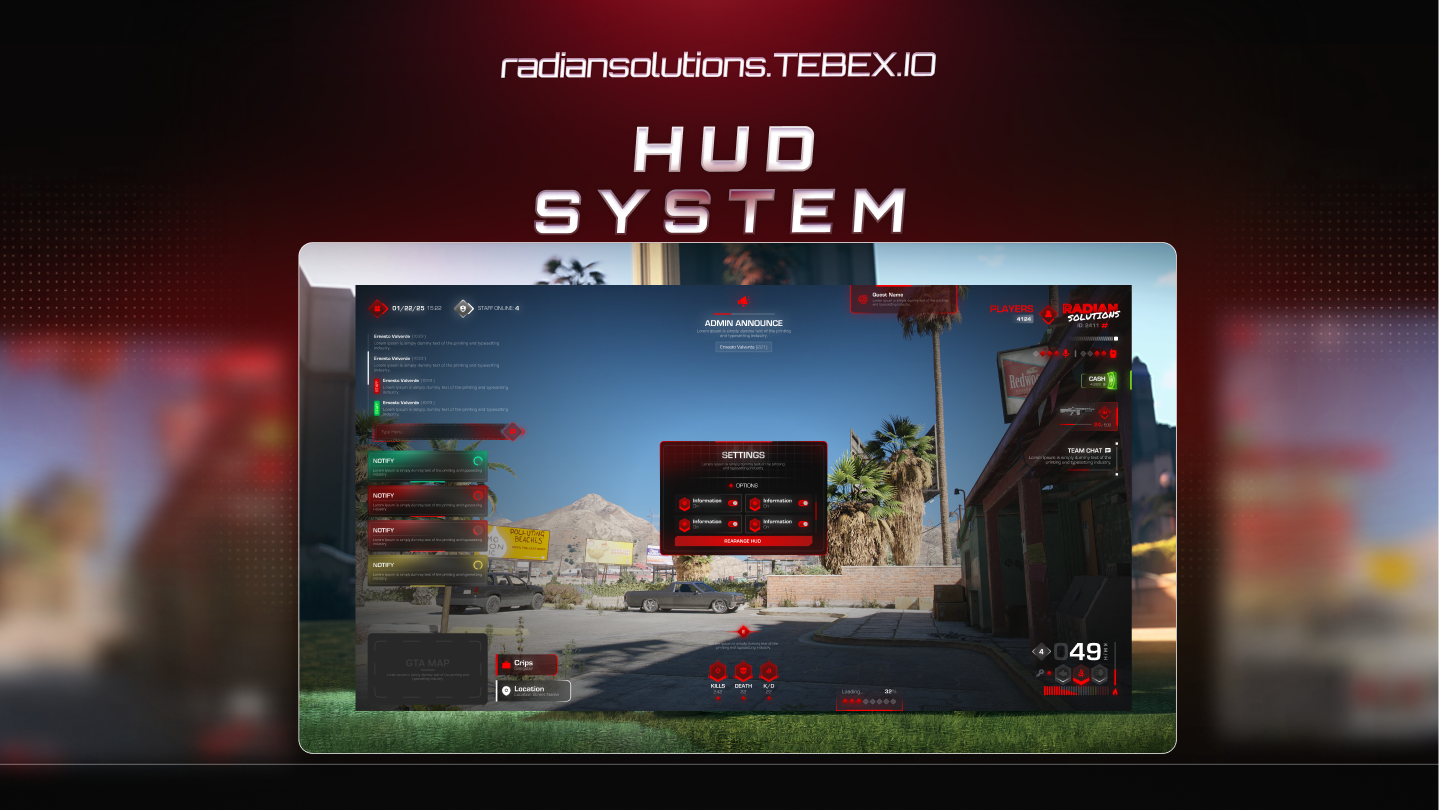
✨ Features
Player HUD
- Server name, player ID, online players and cash (cash updates instantly)
- Date and time, synced from the server
- Location with the nearest postal code
- Job and rank display
- Weapon HUD with ammo count and 100+ weapon icons
- Voice HUD for pma-voice: talking, radio and voice range indicators
- Staff Online counter (visible to staff only)
Two modes: Roleplay & PVP
- RP mode: shows hunger and thirst from esx_status, in 2 styles
- PVP mode: shows kills, deaths and K/D
- Switch between them with one line in the config
Vehicle HUD
- Speed, gear and fuel
- Engine, lock, lights, high beam and seatbelt indicators
- Seatbelt system: with the belt on, you can't fly through the windshield or exit the vehicle
- Built-in fuel consumption based on RPM and vehicle class, with LegacyFuel auto-detected
In-game settings (/hud)
- Drag & drop every element, with an optional snap grid
- Turn each module on or off
- 3 notification styles to choose from
- All settings are saved per player
Notifications & developer exports
- Notify (success, info, warning, error), Announce banners, key help prompts and a progress bar
- Everything is usable through simple exports and events, with full documentation included
Chat & staff tools
- Custom chat with colored staff ranks, streamer mode and anti-spam
- Private staff team chat (
/tc),/announceand/chatclear - txAdmin integration: kicks, bans, warnings and restart countdowns show up as announcements
PVP kill/death system
- Kills and deaths are tracked live and saved in MySQL
- Server-side kill validation: fake kills and kill farming don't count
- A Top 25 Discord leaderboard that updates itself every 10 minutes
Security & performance
- Anti-executor protection on all server-only events
- Every input is validated and length-limited, and all server events are rate-limited
- Optimized threads that only send data when something changes
📦 Requirements
- es_extended
- oxmysql
- Optional: pma-voice, esx_status, LegacyFuel, txAdmin
⚙️ Installation
- Drop
r_hudinto your resources folder. - Import
r_hud.sqlinto your database. - Add
ensure r_hudto your server.cfg. - Set the mode, voice ranges and fuel options in
config.lua, and the HUD labels inconfig.js.